Looking to verify your land details in Gujarat? Whether it’s 7/12 Utara Gujarat, property card download, or urban/rural land records, the AnyRoR Gujarat portal is your one-stop solution. This online service enables citizens to access land ownership data, 7/12 8A Gujarat records, and more directly from their homes.
E-CHAVDI (Rural Records)
Access rural land records
Urban Land Records
View urban property details
Gujarat Land Records
City-Wise
City-wise land information
Digitally Sealed
Property Card
Secure property documents
COVID-19 Ex-Gratia
Ex-gratia assistance portal
Digitally Signed RoR
Record of Rights online
Property Search
(મિલ્કત વિગતો)
Search property details
SSO Gujarat
Single Sign-On portal
Let’s explore how to check your Gujarat land records, download property cards, and understand the various options like e-Dhara, Bhulekh Gujarat, and AnyRoR 7/12 Utara.
Key Documents & Services Available on AnyRoR Gujarat
The portal offers various services for both rural and urban areas:
| Service | Details Provided |
|---|---|
| 7/12 Utara Gujarat Online | Ownership, land area, and usage rights |
| 8A Gujarat Online | Revenue and tax info |
| Property Card Gujarat | Urban property ownership |
| ROR Gujarat Rural | Rural land rights and mutations |
| Bhulekh Gujarat | Government-verified land records |
| E Dhara Gujarat | Digitally signed land documents |
What is AnyRoR Gujarat and Why is It Important?
AnyRoR (Any Records of Rights) is the official land record portal launched by the Gujarat government. It provides transparent, online access to 7/12 Utara Gujarat, land ownership details, and property records. This digital system helps eliminate fraud, improves access for farmers, buyers, sellers, and enhances transparency in land transactions.
You can access rural and urban land records, property card details, and check Gujarat Bhulekh using AnyRoR Gujarat Gov In portal at anyror.gujarat.gov.in.
How to Check 7/12 Land Records (E-CHAVDI) Online in Gujarat (Rural Records)
Want to check your 7/12 land records online? Here’s how to view rural land records on AnyRoR:
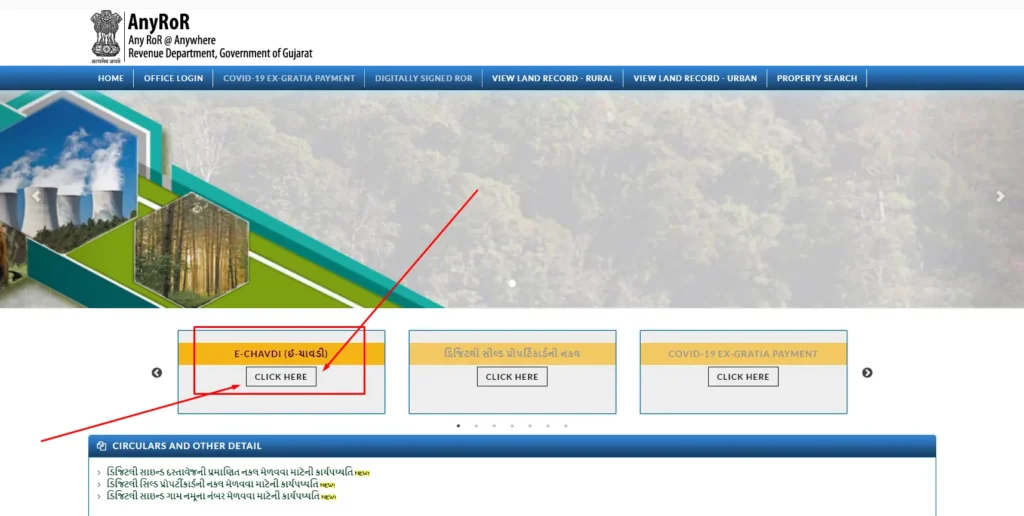
- Open the Gujarat Land Records Website: Visit the official site at https://anyror.gujarat.gov.in/.
- Locate and Click on E-Chavdi (ઇ-ચાવડી): On the homepage, find the E-Chavdi option and click on it.
- Select Required Details:
- Select Any One (કોઇ એક પસંદ કરો): Choose the appropriate option based on your need.
- District (જીલ્લો): Pick the relevant district from the dropdown menu.
- Taluka (તાલુકો): Select the taluka where the property is located.
- Village (ગામ): Choose the village from the list.
- Year (વર્ષ): Enter the year for which you need the records.
- Month (મહિનો): Select the month for the records. Select as per shown in the image below.
- Enter the Captcha: Complete the captcha verification to proceed.
- Click on “Get Record Detail”: Press the button to retrieve the rural land records for Gujarat.
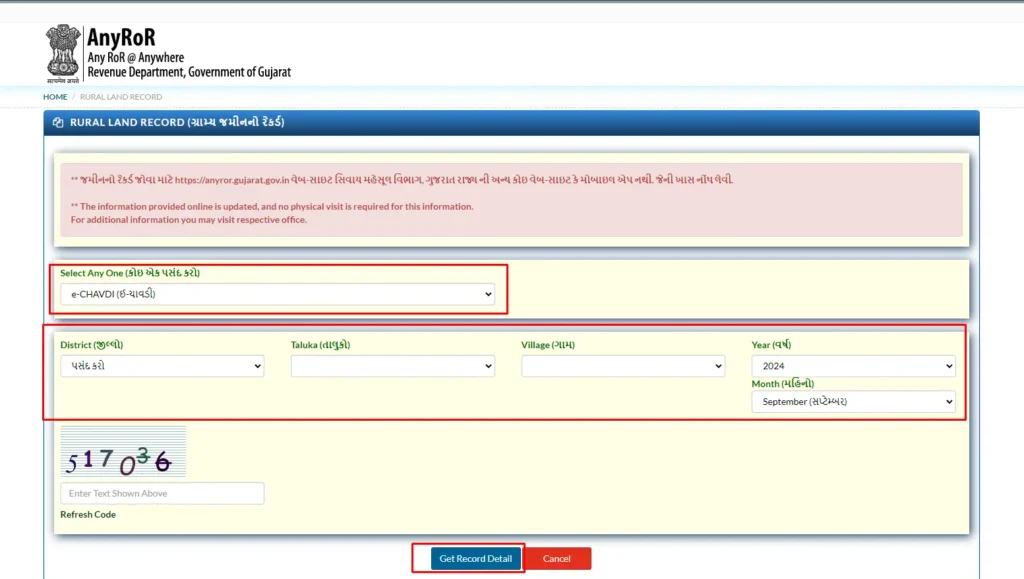
This will display your rural land ownership records, including ROR Gujarat rural and E-Dhara Gujarat records.
How to View Urban Land Records & Property Card in Gujarat (શહેરી જમીનનો રેકર્ડ)?
To check urban property records such as property card (mool card) or unit card, follow these steps:
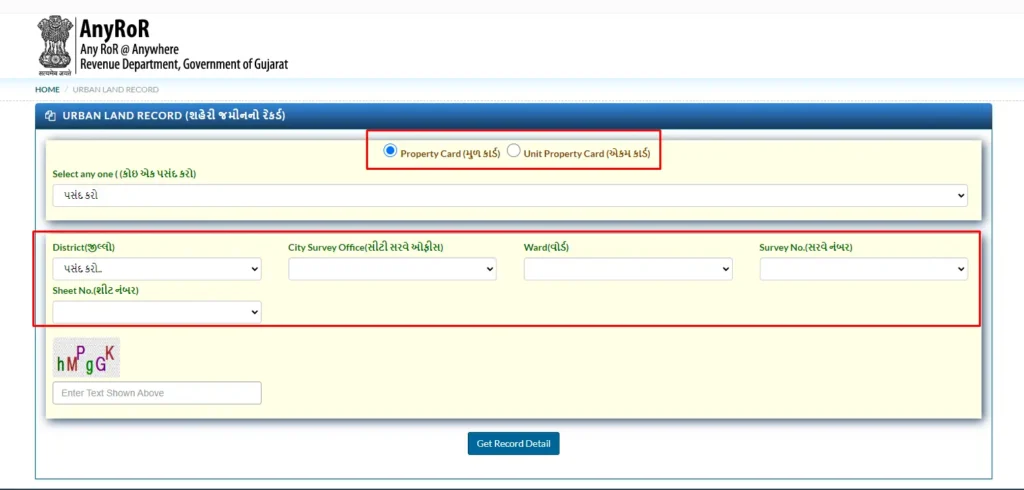
- Access the Urban Land Records Page: Click here to go directly to the urban land records section.
- Select Document Type: Choose between Property Card (મુળ કાર્ડ) or Unit Property Card (એકમ કાર્ડ) based on your need.
- Enter Required Details:
- Select Any One (કોઇ એક પસંદ કરો): Choose the appropriate option from the dropdown.
- District (જીલ્લો): Select the relevant district.
- City Survey Office (સીટી સરવે ઓફીસ): Choose the City Survey Office for the area.
- Ward (વોર્ડ): Pick the specific ward.
- Survey No. (સરવે નંબર): Enter the survey number.
- Sheet No. (શીટ નંબર): Provide the sheet number.
- Enter the Captcha: Complete the captcha verification to proceed.
- Click on “Get Record Detail”: Press the button to retrieve the urban land records details.
You’ll get complete data for Gujarat urban land records including property details, ownership, and survey info.
How to Search Gujarat Land Records City-Wise
To check Gujarat land records by city, follow the steps below:
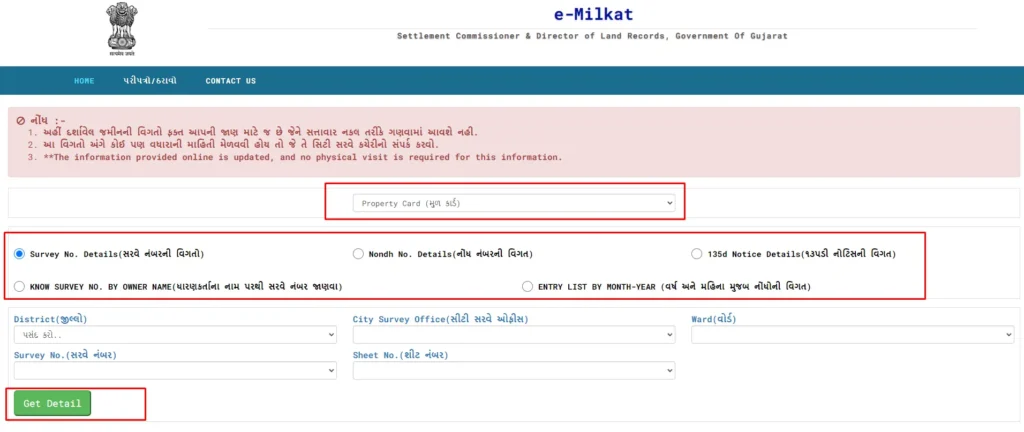
- Click on the following link: Gujarat Land Records.
- Choose one of the following options:
- Survey No. Details (સરવે નંબરની વિગતો)
- Nondh No. Details (નોંધ નંબરની વિગત)
- 135d Notice Details (૧૩૫ડી નોટિસની વિગત)
- Select the appropriate District, City Survey Office (સીટી સરવે ઓફીસ), Ward, and other required details.
- Finally, click on the Get Details button to view the information.
This feature is perfect for users looking for 7/12 Gujarat online, bhulekh Gujarat online, or online property card Gujarat in cities like Ahmedabad, Surat, Rajkot, and more.
Digitally Sealed Property Card – Application Process
The Digitally Sealed Property Card (ડિજિટલી સીલ્ડ પ્રોપર્ટી કાર્ડ) is an authenticated digital certificate issued by the Gujarat Revenue Department. This service enables property owners to obtain a tamper-proof, legally valid property document online.
Step-by-Step Application Process
Step 1: Access the Portal & Select Service
- Visit the official AnyROR Portal (anyror.gujarat.gov.in)
- Navigate to: Services → Digitally Sealed Property Card
- Select Option: OptionDescriptionઅરજી દાખલ કરવાFile New Applicationદાખલ કરેલ અરજીની પ્રિન્ટ કરવાPrint Submitted Application
Step 2: Applicant Information
Enter the following details:
- Applicant’s Name (અરજદારનું નામ)
- Mobile Number (મોબાઈલ નંબર)
- Email Address
- Gender (લિંગ)
Step 3: Property Card Details
Select & Enter:
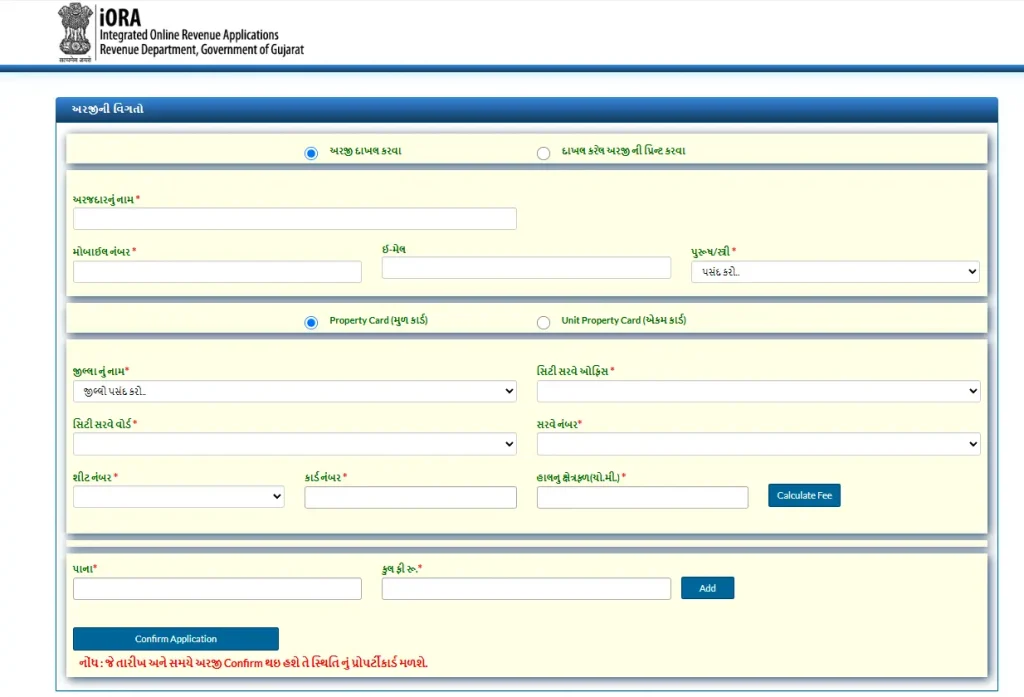
- Property Card Type: मूल कार्ड (Original Card)
- District (જિલ્લાનું નામ) Dropdown: Ahmedabad, Surat, Vadodara, Rajkot, etc.
- City Survey Office (સિટી સરવે ઓફિસ) Dropdown: Office List
- City Survey Ward (સિટી સરવે વોર્ડ) Dropdown: Ward Numbers
- Survey Number (સર્વે નંબર) Text: e.g., 123/1
- Sheet Number (શીટ નંબર) Text: e.g., 45
- Card Number (કાર્ડ નંબર) Text: e.g., PC-2023-001
- Current Area (હાલનું ક્ષેત્રફળ) Numeric: e.g., 1500 (in ચો.મી.)
Step 4: Fee Calculation
- Click “Calculate Fee” (કેલ્ક્યુલેટ ફી) button
- System auto-computes fee based on:
- Area (ચો.મી.)
- Pages (પાના)
- District rates
Step 5: Finalize Application
- Review summary
- Click “Confirm Application”
Step 6: Download Digitally Sealed Card
- Status Check: Use Application Number on portal
- Download: PDF with Digital Signature & QR Code
- Validity: Lifetime (tamper-proof)
COVID-19 Ex-Gratia Payment Login Procedure
The COVID-19 Ex-Gratia Payment scheme, administered by the Government of Gujarat, provides financial assistance of ₹50,000 to the families of individuals who succumbed to COVID-19. Applications and tracking are managed through the iORA Portal (Integrated Online Revenue Application). This tamper-proof, Aadhaar-linked system ensures direct bank transfer of funds, minimizing delays.
- Portal: iORA COVID-19 Login
- Eligibility: Next of kin of deceased with confirmed COVID-19 death (as per MCCD or audit).
- Processing Time: 30 days from document submission.
- Mode: 100% Online
Note: No physical visits required. Claims settled via District Disaster Management Authorities.
Login Options
Upon accessing the portal, select one of the following:
| Option | Gujarati | Description |
|---|---|---|
| New Application | નવી અરજી કરવા માટે | File a fresh claim for ex-gratia payment. |
| Registered Application | દાખલ કરેલ અરજી માટે | Track or update a previously submitted application. |
| Appeal to Grievance Redressal Committee (GRC) | ફરિયાદ નિવારણ સમિતિ સમક્ષ રજૂઆત કરવા માટે | File an appeal for rejected/pending claims. |
Step-by-Step Login Process
Option 1: New Application (નવી અરજી કરવા માટે)
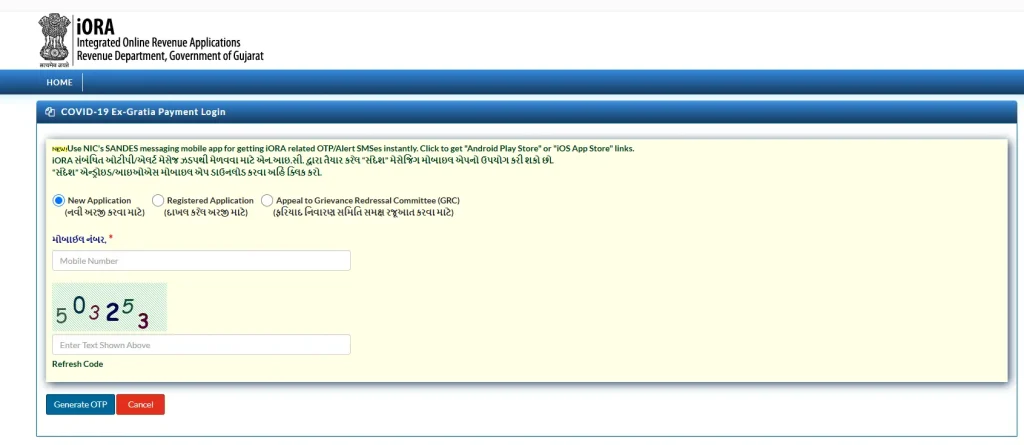
- Select New Application.
- Enter Mobile Number (મોબાઈલ નંબર): Use the registered 10-digit number linked to the applicant.
- Solve CAPTCHA: Verify humanity by completing the image/text challenge.
- Click “Get OTP”: An One-Time Password will be sent via SMS to the entered mobile.
- Enter OTP: Input the 6-digit code to authenticate and proceed to the application form.
- Required Documents: Death Certificate, COVID-19 treatment records, Bank details (Aadhaar-linked), and Proof of Relationship.
Option 2: Registered Application (દાખલ કરેલ અરજી માટે)
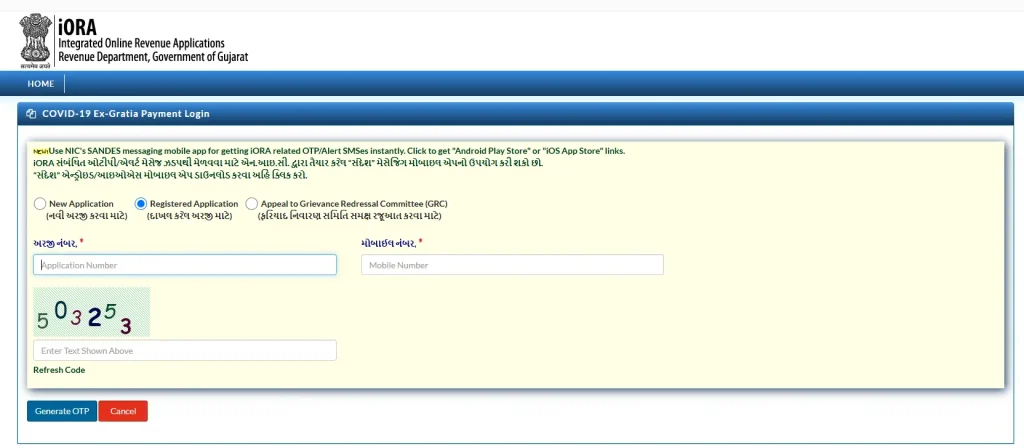
- Select Registered Application.
- Enter Application Number (અરજી નંબર): Retrieve from previous confirmation email/SMS.
- Enter Mobile Number (મોબાઈલ નંબર): Must match the one used during initial submission.
- Solve CAPTCHA: Complete the security verification.
- Click “Get OTP”: Receive and enter the OTP sent to the mobile for access.
- View status, download acknowledgment, or upload additional documents if required.
Option 3: Appeal to Grievance Redressal Committee (GRC) (ફરિયાદ નિવારણ સમિતિ સમક્ષ રજૂઆત કરવા માટે)
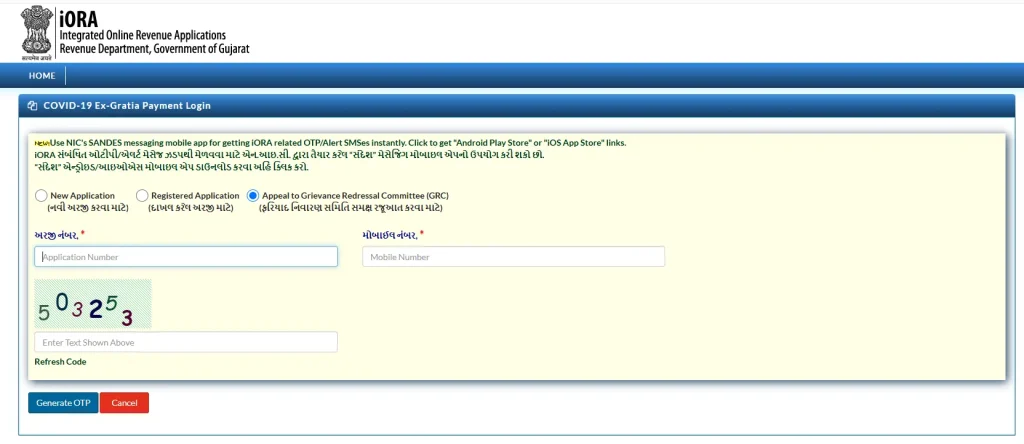
- Select Appeal to GRC.
- Enter Application Number (અરજી નંબર): From the original rejected/pending application.
- Enter Mobile Number (મોબાઈલ નંબર)*: Mandatory and must be registered.
- Solve CAPTCHA: Verify via the challenge.
- Click “Get OTP”: Authenticate with the SMS-delivered code.
- Submit grounds for appeal, including supporting evidence (e.g., MCCD discrepancies).
- GRC reviews within 15-30 days; decision via email/SMS.
Post-Login Actions
- For New Application: Fill beneficiary details, upload scanned documents (PDF/JPG, max 5MB each), and submit. Receive Application Number instantly.
- Payment: Approved claims disbursed via Direct Benefit Transfer (DBT) to Aadhaar-seeded bank account.
- Status Tracking: Use Application Number on the portal or helpline.
- Rejection Appeal: Only via GRC; no fee applicable.
Guide to Obtain Digitally Signed Record of Rights (RoR) from iORA Gujarat Portal
1. Access the Official iORA Gujarat Website
- Open a web browser and navigate to the official Gujarat iORA portal: https://iora.gujarat.gov.in/
2. Navigate to Digitally Signed RoR Service
- From the homepage, click on “Digitally Signed ROR” service link, or
- Directly access the service page: https://iora.gujarat.gov.in/ror_online.aspx
3. Enter Required Details
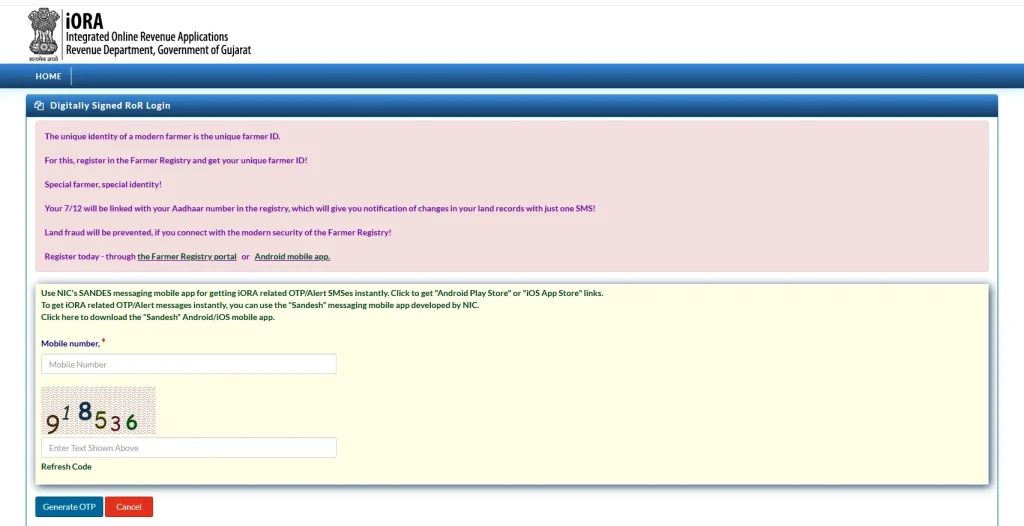
- Mobile Number Field: Enter your Aadhaar-linked mobile number (as shown in the provided screenshot)
- Captcha Verification:
- Type the 6-digit captcha code displayed in the image
- Click “Change Captcha” if the image is unclear
4. Initiate OTP Verification
- Click the “Send OTP” button
- An OTP (One-Time Password) will be sent to your Aadhaar-linked mobile number
5. Complete OTP Authentication
- Enter the 6-digit OTP received via SMS
- Click “Verify OTP” or “Submit”
6. Access Digitally Signed RoR Details
- Upon successful verification, the system will display your Digitally Signed Record of Rights (RoR)
- The RoR will include: Document DetailsDescriptionVillage NameLand location detailsSurvey NumberProperty identificationOwner DetailsRegistered landowner informationArea & Cultivation DetailsLand measurement & usageDigital SignatureGovernment authenticationIssue DateDocument validity date
7. Download the Document
- Click “Download” to save the digitally signed RoR in PDF format
- The document is legally valid for all official purposes
Important Notes
- Prerequisites: Ensure your mobile number is linked with Aadhaar
- Internet Connection: Stable broadband connection recommended
- Browser Compatibility: Use latest version of Chrome, Firefox, or Edge
- Document Validity: Digitally signed RoR is valid for lifetime (unless land records are updated)
- Support: For technical issues, contact iORA Helpdesk: 1800-233-5500
This digitally signed RoR serves as an authentic, tamper-proof land record document issued by the Government of Gujarat.
FAQs – Gujarat Land Records & AnyRoR Portal
It is an official land document showing ownership, area, and rights over agricultural land.
Visit the AnyRoR portal, enter property details under the urban section, and download the card.
Yes, the portal supports both AnyRoR Rural Land Record and Urban Land Records.
Check your internet connection or revisit later. You may also contact local e-dhara centers.
Yes, the website is mobile-friendly and can be accessed through a smartphone browser.